


StoryGraph
4.61.24K Reviews
App Specs
- Version
- 1.29
- Updated On
- License
- Free
- Downloads
- 1,000,000+
- Developer
- The StoryGraph
- Categories
- Books & Reference
- Platform
- Android, iOS
Screenshots
 Analysis by AppCompare
I like a reading app best when it helps me answer a simple question: what do I feel like reading now? A long list of popular titles is not always useful when I’m tired, short on time, or in the mood for something very particular. That’s the problem StoryGraph sets out to make easier, pairing a personal reading record with discovery tools that take mood and subject matter into account.
It is a free Books & Reference app from The StoryGraph, with optional in-app purchases. It has a 4.4 average from around 5,900 ratings and more than a million installs, so it has attracted a sizable readership without needing to be everyone’s kind of book app. I find its central idea appealing: instead of treating reading as a race to finish the biggest possible list, it gives you ways to notice what you enjoy and use that knowledge when choosing your next book.
What the current version is built around
The app is currently at version 1.28 and runs on Android 8.0 or later. It is rated Teen, a useful point to know if you are choosing reading tools for a younger reader or setting up an account in a family context. Its core appeal is not a digital library for reading books inside the app; it is a place to organize your reading life, explore titles, and make decisions about what to pick up next.
That distinction matters when comparing it with a bookstore app, an ebook reader, or a library service. Those tools may be better when your main goal is buying, borrowing, or opening a book on your phone. I see StoryGraph as a companion to those services: it helps me decide what I want to read and keep track of the books I have read, while the actual book can come from wherever I normally get it.
Get Started with Ease
First things first, setting up StoryGraph is a breeze. You can sign up using your email or link it to your existing Goodreads account. But what really caught my eye was the personalization aspect of the app. During setup, you’re invited to answer a few insightful questions about your reading tastes. Are you in the mood for something fast-paced or a leisurely read? Do you prefer happy endings or something that tugs at the heartstrings? These questions help tailor the recommendations to your exact preferences.
A Deep Dive into Features
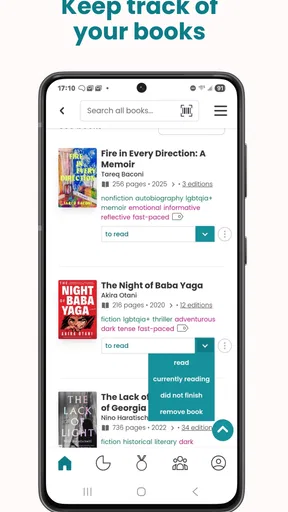
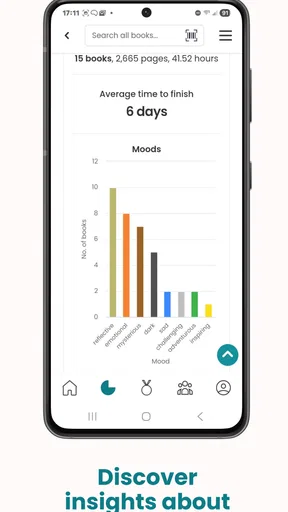
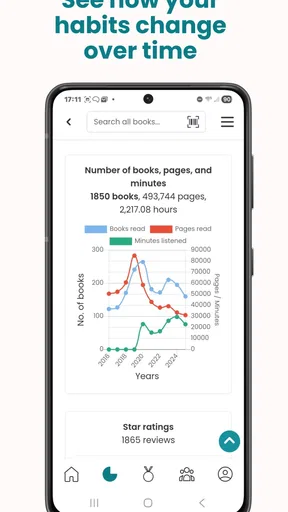
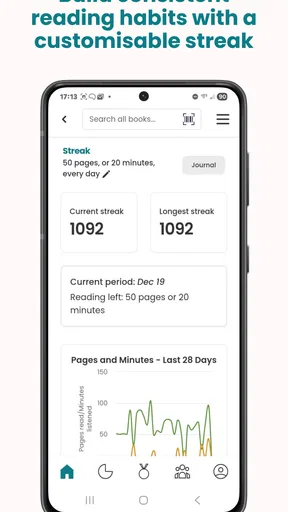
Once you’re all set up, the real fun begins. StoryGraph boasts a clean and intuitive interface. Navigating through the app feels natural, with your personalized recommendations front and center. You can also track your reading habits with detailed stats, which I found surprisingly motivating. Seeing a visual breakdown of the types of books I’ve read over the year (fiction vs. non-fiction, mood, pacing) was a game-changer for setting future reading goals.
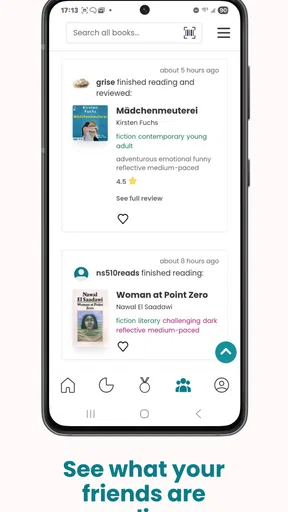
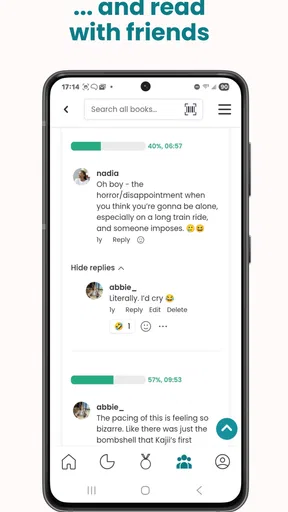
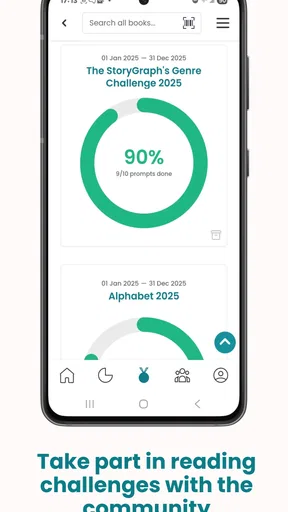
Another feature worth mentioning is the community aspect. You can follow friends to see what they’re reading, join book clubs, and even participate in reading challenges. It’s like having a mini book club right at your fingertips. Plus, the app doesn’t bombard you with ads or unnecessary notifications, which is a huge plus in my book.
Worth Reading Before You Choose

Flipboard Shows What News Apps Must Do Beyond the Feed

Switching to Android Auto Means Rethinking Your Driving Routine

Google Calendar Makes a Crowded Week Easier to Manage

Ludo King Makes the Most of the Minutes Between Plans

Baby Panda World Brings Quick Play to Modern Phones, but Its Game Library Feels Busy

ESPN’s Live Game View Makes Following Close Games Easier
Making recommendations work harder
The useful way to approach recommendations is as a shortlist, not a verdict. I’d tell a new user to rate or log books they genuinely remember well before judging whether the suggestions feel personal. A broad reading history gives the app more to work with; a handful of entries can make any recommendation system feel oddly confident about a narrow sample. If your tastes change with the season, updating what you’re looking for is more practical than assuming an old preference should guide every choice.
Filters are most valuable when they solve a real decision. For example, if I have a weekend trip coming up, I can narrow my search toward a shorter book rather than saving a 600-page novel I won’t have time to start. If I want to diversify my reading, an author or subject filter can turn that vague intention into a manageable search. The trade-off is that detailed filtering asks you to know at least part of what you want; when I’m completely undecided, browsing recommendations is less work.
Community opinions are useful as another perspective, but I wouldn’t treat a rating as a substitute for my own taste. A book’s pace or emotional tone can matter more to me than whether it is broadly popular. I use other readers’ reactions to spot themes or expectations, then decide whether those sound appealing. That makes the social layer a helpful companion to discovery rather than a reason to choose a title automatically.
A practical reading routine
Picture a familiar moment: I finish a novel on the bus home, open the app, and want something different for the next commute. Rather than scrolling through a store’s bestseller carousel, I can check my reading record, look for titles that suit the mood I have in mind, and save a few candidates to consider later. When I start one, keeping the record current means future stats and recommendations have a better foundation.
There is a small but meaningful habit behind that workflow: log a book when you finish it, while your reaction is still fresh. A quick, honest note about whether it felt slow, uplifting, or challenging is more useful to your future self than trying to reconstruct your feelings months later. I would also avoid logging every book as a five-star favorite just to keep a tidy profile. A reading history only helps you spot patterns if it reflects your actual responses.
For people who read across formats, the app can serve as a common record even when books come from different places. You may borrow one, buy another, and listen to something else, but keeping the titles together makes your overall reading year easier to review. It is especially handy if you want to notice whether you have been reaching for the same kind of story repeatedly or leaving a genre untouched.
Where it fits among reading apps
Compared with a basic spreadsheet or notebook, StoryGraph offers a more guided way to explore books and see patterns in your reading. A spreadsheet can be easier for someone who wants complete control over custom columns, but it takes effort to maintain and cannot offer the same discovery experience. Compared with Goodreads-style tracking, the appeal here is the emphasis on mood, pacing, and tailored reading choices; readers who already have a settled community elsewhere may still prefer to keep that social routine in place.
It also occupies a different role from Kindle or other ebook readers, which focus on reading the text itself, and from library apps, which focus on access to borrowed titles. I would not replace those tools with StoryGraph if borrowing or reading on-screen is the priority. I would use them alongside it: one place to find and organize possibilities, another to get the book in the format I want.
Who will get the most from it
I think it suits readers who enjoy looking back at what they have read, want suggestions more personal than a generic bestseller list, or like setting a gentle reading challenge. It can also help someone returning to books after a long break: a manageable goal and a few mood-matched options feel less intimidating than an ambitious annual target. Book-club members may find the tracking useful between meetings, while friends can use the social side to keep their reading conversations going.
On the other hand, I would skip it if I only need a place to open ebooks, borrow digital titles, or maintain a highly customized catalogue without recommendations. It may also feel like extra administration to a casual reader who finishes only a few books and has no interest in stats or challenges. The app’s strengths become more apparent when you put in enough reading history to make tracking meaningful, so it is not essential for everyone who picks up a book now and then.
Trade-offs and expectations
Personalized suggestions depend on the quality of the information behind them. If you have not logged much, or if you read outside your usual preferences, the app may have less context for what would suit you. That is not a reason to avoid trying it; it is a reason to treat early recommendations as experiments and give the system time to reflect your real habits. I also find that recommendation tools work best when I remain willing to ignore them. Sometimes the right next book is one a friend mentioned, not the one that appears to match a profile.
The social features are another matter of preference. Following friends and joining reading activities can make the experience more lively, but readers who want a private, minimal log may not care about that layer. Likewise, detailed statistics can motivate me, yet they can turn reading into a performance if I focus too much on totals. I’d use the numbers to notice patterns, not to judge whether I have read enough.
The app is free to start, with in-app purchases listed from $4.99 to $49.99 per item. I would begin with the free experience and decide whether any optional purchase fits how I actually use it, rather than assuming paid extras are necessary. That keeps the choice straightforward: the main question is whether its approach to tracking and discovery suits your reading habits.
Changes, continuity, and what to watch
The release date is June 22, 2021, and the current version is 1.28. Those are useful reference points for understanding that this is an established app with a current numbered release, but they do not by themselves tell me what changed between versions. I would not assume a particular feature was added or redesigned without a clear release note. For existing users, the practical test is simpler: does the version available on their device continue to support the routines they rely on, such as recording books, revisiting reading patterns, and finding titles?
If you already use StoryGraph, I’d pay attention to whether recommendations still reflect your changing interests and whether the logging process remains easy enough that you keep up with it. If you are new, I’d treat the first few sessions as setup for a longer-term habit: add a representative selection of books, explore one or two filters, and see whether the suggestions improve your decisions. Product evolution is most meaningful when it makes that everyday loop clearer, not merely when a version number moves forward.
My remaining reservation is that a reading tracker can only be as useful as the routine you build around it. Logging too much detail may become a chore; logging nothing leaves little for the personalized side to draw on. I’d keep the process light, use stats when they answer a question I care about, and let recommendations broaden my options rather than dictate them. I’d also watch whether future changes preserve the app’s distinctive focus on reading mood and personal patterns, since that is what separates it from a plain list of titles.
Finding Your Next Great Read
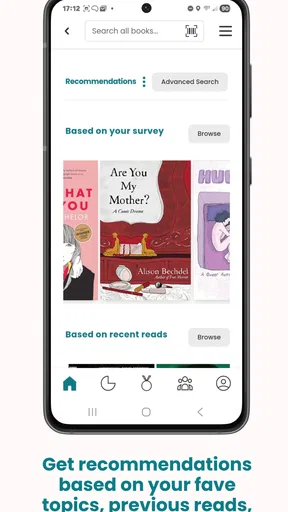
The recommendation engine is where StoryGraph truly shines. It learns from your reading history and preferences to suggest books that are likely to resonate with you. Whether you’re looking for a quick thriller or a deep historical drama, the app’s suggestions are spot-on. And if you’re ever stuck, the community reviews and ratings offer additional insights.
One nifty feature is the ability to filter search results based on specific criteria. Want a book under 300 pages? How about something written by a female author? You can customize your search to match your exact needs.
Final Thoughts
So, is StoryGraph worth the download? Absolutely. It offers a refreshing take on book discovery and tracking, making it a must-have for avid readers. The app’s sleek design, coupled with its powerful recommendation engine, ensures that you’ll always have a book ready to dive into.
Whether you’re a seasoned bookworm or just looking to rekindle your love for reading, give StoryGraph a try. It might just become an essential part of your reading journey, guiding you to your next great literary adventure.
Pros
- User-friendly interface enhances navigation.
- Provides personalized book recommendations.
- Tracks reading habits and progress efficiently.
- Supports diverse reading goals and challenges.
- Ad-free experience for uninterrupted use.
Cons
- Limited social interaction features.
- Some advanced features are subscription-based.
- Doesn't integrate with all e-readers.
- Occasional bugs in app updates.
- Limited offline functionality.
FAQs for StoryGraph
What is StoryGraph and how does it differ from other reading apps?
StoryGraph is a versatile app designed to help users track their reading habits, discover new books, and connect with other readers. Unlike other reading apps, StoryGraph offers personalized recommendations based on your reading preferences and mood. It also provides detailed statistics, such as reading speed and genre preferences, enhancing the overall reading experience.
Is StoryGraph free to use, and are there any premium features?
Yes, StoryGraph offers a free version with essential features for tracking your reading progress and accessing basic recommendations. However, there is a premium subscription called StoryGraph Plus, which provides advanced features like enhanced statistics, more precise recommendations, and priority support. This subscription is optional but enriches the app experience for avid readers.
How does StoryGraph help in discovering new books to read?
StoryGraph uses a unique algorithm to suggest books based on your reading history, preferences, and mood. It allows users to set specific criteria, such as genre, mood, and pace, to tailor recommendations. This personalized approach ensures that users find books that truly match their interests, making the discovery process enjoyable and efficient.
Can I import my reading data from Goodreads to StoryGraph?
Yes, StoryGraph allows you to import your reading data seamlessly from Goodreads. This feature ensures that your reading history is preserved and can be used to enhance your experience on StoryGraph. Detailed instructions are provided within the app to guide users through the import process, making the transition smooth and straightforward.
Does StoryGraph have a community or social features for interaction with other readers?
StoryGraph includes a community aspect where users can follow friends, share book reviews, and participate in reading challenges. While it doesn’t have the same social networking features as some other platforms, it focuses on fostering meaningful connections through shared reading interests and personalized book suggestions, creating a supportive reader community.


